
Want to learn the basics of SEO? This beginner's guide to search engine optimisation is for you. Here you will learn:
- What is SEO?
- How do search engines and SEO work?
- Where do you start with SEO?
Read on to start your SEO journey.
Chapter 1: SEO basics
Learn the basics of SEO, including:
- What is SEO?
- How do search engines work?
- How does SEO work?
- Why does SEO matter?
Or skip straight to the next chapter on on-page SEO basics.
What is SEO?
Search engine optimisation (SEO) is the work of optimising a website to improve its visibility in organic search results, for example the results on Google. SEO typically takes three to six months to start delivering results. The most common SEO optimisations include improving page load speed, keyword research and content creation.
Is this too basic for you? Read our on-page SEO guide to learn more about how SEO works for your website.
How do search engines work?
When it comes to SEO basics, you need to understand how search engines work. Search engines sit at the heart of search engine optimisation, and the way they work shapes the strategies, best practices and tips to follow.
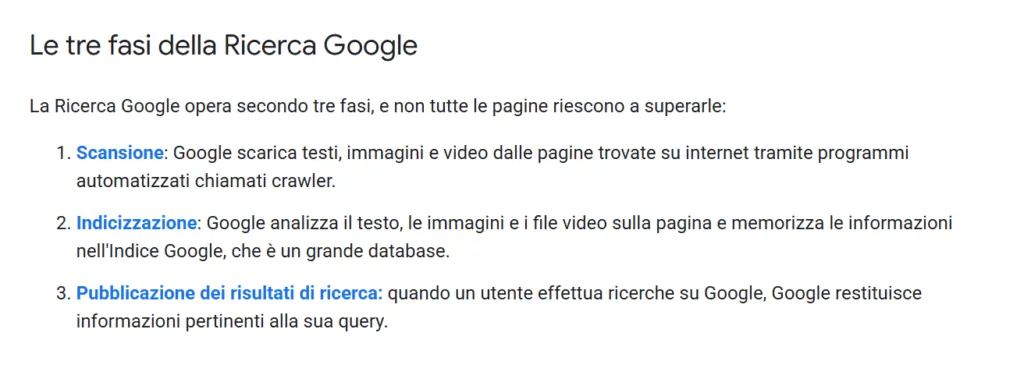
The way search engines work can be broken down into the following steps:
- Crawling
- Indexing
- Ranking
You can find out more about each of these processes below:
🕷️ Crawling
Search engines are like a library, and to build their library they have to crawl the web. Search engines rely on web crawlers (or spiders) to discover content on the web. The crawlers then pass this content back to the search engines, which in turn index it.
📚 Indexing
The indexing stage is like a librarian who examines, organises and shelves the books in a library. At this stage the search engine's algorithm catalogues the content that the search engine will draw on to return results to users.
⚖️ Ranking
Ranking is the final step in how search engines work.
When someone searches on Google or Bing, these search engines rely on their algorithms to return personalised results in line with the user's needs and preferences, such as their location, previous searches and more.

How content appears in search results depends on these elements, together with more than 200 other factors. These ranking factors (which do not all carry the same weight) cover several areas, from website security to online reputation and the usefulness and authority of the content.
When you put SEO into practice, you optimise for more than 200 factors (or at least the most important ones).
How does SEO work?
Search engine optimisation (SEO) works by optimising a website for more than 200 ranking factors. To be clear, though, SEO specialists do not optimise for all 200 factors. Instead, they focus their efforts on the ranking factors that matter most.
These factors can be grouped into three categories:
- Off-page SEO: off-page SEO focuses on your site's online reputation.
- On-page SEO: on-page SEO focuses on your site's user experience.
- Technical SEO: technical SEO focuses on your site's backend optimisation.
Each of these categories contains a range of optimisations to work on. This table gives you an idea of some of them:
| SEO category | Optimisations |
|---|---|
| Off-page SEO | Building links to your website Creating content, tools and other shareable assets |
| On-page SEO | Researching relevant keywords Optimising title tags and meta descriptions Adding internal links |
| Technical SEO | Improving page speed Implementing HTTPS security Adding schema markup |
Why does SEO matter?
Search engine optimisation matters for several reasons. Here are the main ones.
Visibility
SEO helps websites like yours improve their online visibility without the costs of pay-per-click (PPC), such as Google Ads, or social media advertising. With this kind of visibility you can reach your target audience at the right moment, just as they are searching for the products or services you offer.
Targeting
Search engine optimisation is also useful for its targeting capabilities. Whether you want to reach people in a specific city or people in the decision stage of the buying journey, you can do it with SEO.
Always on
SEO does not switch off: it keeps working for your business and your website around the clock. Both during and outside office hours, people can find your business online and start their path to becoming customers.
Results
Businesses in every sector, from business-to-business (B2B) to business-to-consumer (B2C), have seen consistent results from search engine optimisation in terms of traffic, leads and sales.
In short, SEO matters because it helps website owners generate qualified traffic and sales.
If SEO sounds like a full-time job so far, that is because it is. If you would like professional help to improve your SEO strategy, take a look at our SEO services.
Chapter 2: On-page SEO basics
Learn the basics of on-page search engine optimisation, including:
- Definition
- Why it matters
- Optimisation
Or skip straight to the next chapter on SEO content.
What is on-page SEO?
On-page SEO is the optimisation of on-site elements for search engines, and it includes:
- Keyword research
- Title tags
- Meta descriptions
- Headings
- Images
- Internal links
- URLs.
Learning on-page SEO is essential, especially if you plan to do your SEO yourself rather than with the help of an SEO agency.
Why does on-page SEO matter?
On-page SEO matters because it helps search engines and users to:
- Discover your content
- Understand your content.
To rank well in search results, you need on-site SEO work.
How to do on-page SEO
To get started with on-page SEO, follow these basic best practices:
Keyword research

Use Keywords Everywhere, Ahrefs, Semrush or Google Search to find high-volume, low-competition search queries relevant to your business and your target audience. Focus on long-tail keywords (queries of three or four words) for more targeted coverage.
Title tags

Write compelling title tags for your content following SEO best practice. For example, use the search results for your target keyword to work out the best format and structure. Then include your target keyword and keep the length to a maximum of 60 characters.
Meta descriptions

Write informative meta descriptions for your content following similar best practice. For example, answer the search intent of your target keyword and remember to include the keyword itself. Keep your meta description to 150 characters or fewer.
Headings

Organise your content with SEO-friendly heading tags, such as H1, H2, H3 and so on. You can take cues from the sites ranking highest for your target keyword to better understand the search intent behind that query.
Some of the best rank tracking tools, such as Ahrefs, can help you identify the pages that rank well for your keyword. Then use heading tags to work in your keyword and help users find the information they need.
Images

Use images, from screenshots and graphics to stock photos, to meet search intent and improve the user experience. Optimise your images with short, descriptive file names and alt text. Then compress them before uploading them to your site with a free tool such as Squoosh.
Internal links
Help search engines and users navigate your site with internal links. Put your most important URLs in the menu and footer, and make sure every page on your website receives at least three internal links (with suitable, descriptive anchor text) from other internal URLs.
URLs

Organise your website with a logical architecture, for example by putting informational content in a /blog/ folder and product pages in a /products/ folder. Use hyphens to separate words and keep URL slugs short and concise.
For example:
/google-pixel-case/
is better than:
/123456-google-pixel-case/.
Find out more about on-site SEO in our on-page SEO guide.
Need professional help with on-page SEO? We can take care of it. Have a look at our on-page SEO services and get in touch with our team.
Chapter 3: SEO content
Learn the basics of search engine optimisation for SEO content, including:
- Definition
- Why it matters
- Optimisation
Or skip straight to the next chapter on off-page SEO basics.
What is SEO content?
SEO content is online content optimised for search engines. Types of SEO content include:
- Blog posts
- In-depth guides
- Interactive content
- Videos
The most common optimisations for SEO content include:
- Using targeted keywords
- Optimising the structure of the content
- Improving readability
- And more.
Why does SEO content matter?
So, why does content matter for SEO? SEO content matters for several reasons, including:
- It helps search engines assess how useful a URL is
- It attracts qualified, targeted traffic to a website
- It builds a website's authority and trust in its field
- It builds relationships with readers
A lack of compelling content is one of the most common reasons a website does not generate leads. In search engine optimisation, content is not optional: it is what attracts, nurtures and converts leads.
How to create SEO content
Start creating SEO content with these basic rules.
Topic research
Talk to the team members who deal with customers (you can also look at online forums) to understand your target audience's needs, then use keyword research tools to find the best keywords for those topics.
E-E-A-T

Make the most of your E-E-A-T: experience, expertise, authoritativeness and trustworthiness (the framework described in Google's Search Quality Rater Guidelines) by writing content that includes your first-hand experience and opinion, and by highlighting your brand's years of experience, certifications and other trust signals.
Content structure
Optimise the structure of your content by also comparing the top results in the SERP for the search term you have chosen. You can decide the order in which to answer questions based on search intent.
Content that is easy to skim

Help users find their way around your content by improving readability and catering for people who want to skim by jumping straight to the section they are interested in.
In the example above, the highlighted buttons let readers jump from one main section of the recipe to another, for example from the introduction to the ingredients.
Use headings, short paragraphs, lists (ordered and unordered) and text formatting (such as bold, underline or italics) to help users find what they need faster.
Readability
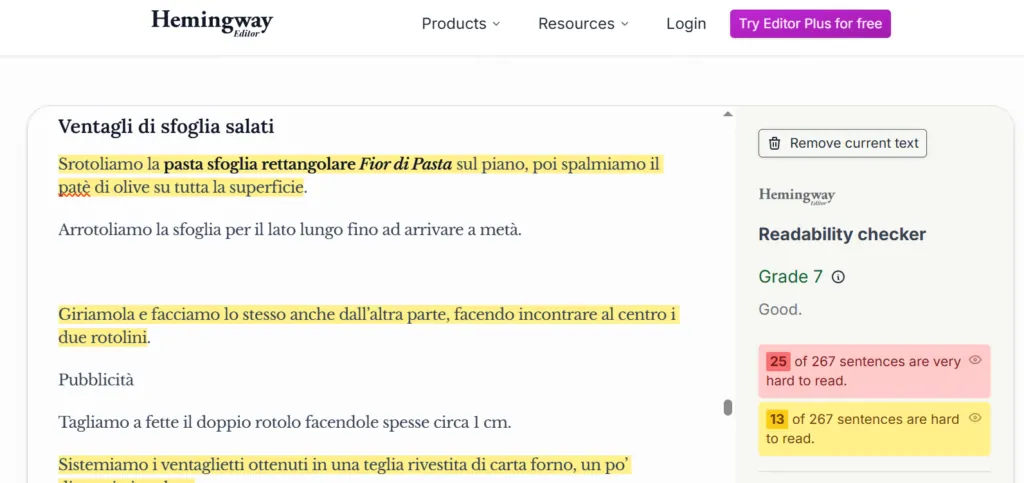
Use free tools such as Grammarly and Hemingway Editor to proofread your content. These tools can help you spot grammar and spelling mistakes, and point out ways to improve the readability of your content for your audience.
Find out more about content in our SEO content guide.
Chapter 4: Off-page SEO basics
Learn the basics of off-page search engine optimisation:
- Definition
- Why it matters
- Optimisation
Or skip straight to the next chapter on technical SEO basics.
What is off-page SEO?
Off-page SEO is the off-site optimisation of a website. Off-site optimisations include earning trustworthy backlinks, claiming and optimising local directory listings, managing online reviews and taking part in communities.
Why does off-page SEO matter?
Off-page SEO matters for several reasons, including:
- It helps search engines understand your site's authority and online reputation
- It gives users basic information about your site through online reviews and local listings
- It is one of the most influential SEO ranking factors.
As one of the most important ranking factors in SEO, off-page optimisation belongs in your SEO checklist.
How to do off-page SEO
Get started with off-page SEO with these basics and tips from our SEO checklist:
Content
Produce original content, from research-based blog posts to interactive tools, to generate interest and attract authoritative backlinks. Without original content you will struggle to earn backlinks.
Outreach
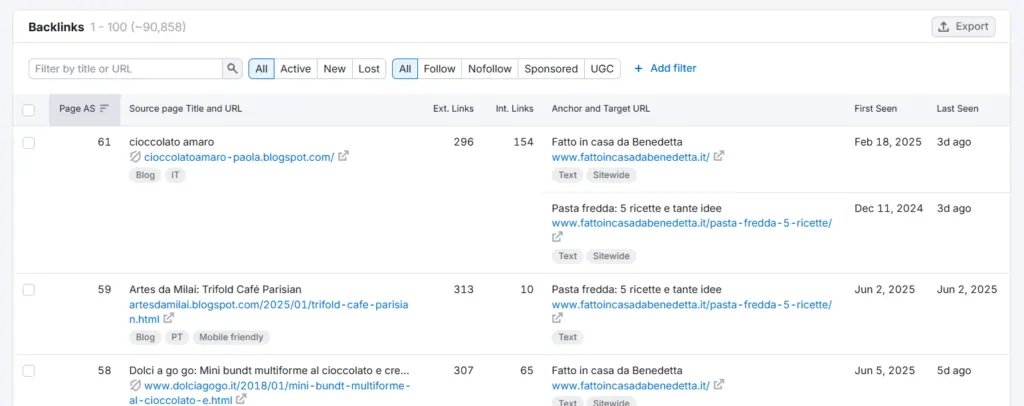
Try contacting publishers in your sector, from news sites to bloggers and influencers. Offer value by suggesting a replacement for a broken link on their site or by pitching an interesting content idea (which you are willing to write). Do not expect only positive replies.
Local listings
Claim and optimise local listings such as Google Business Profile and Bing Places. As well as linking to your website, these listings help show search engines (and users) that your business is genuine.
Online engagement

Engage with your audience through local communities and relevant online forums, such as Reddit or Quora, to build your reputation as a reliable source of information. Avoid selling or promoting too hard on online forums: it can backfire and create distrust.
Find out more in our off-page SEO guide.
Chapter 5: Technical SEO basics
Learn the basics of technical search engine optimisation:
- Definition
- Why it matters
- Optimisation
Or skip straight to the next chapter on local SEO basics.
What is technical SEO?
Technical SEO is the optimisation of a site's technical elements. These include:
- Page speed
- Page experience
- Pages optimised for every device (responsive)
- Site security
- Robots.txt file
- Sitemap
- Structured data
- And more.
This area of SEO often calls for working with developers and web designers. Take a look at our web design services to see how we can help you optimise your site for the elements above and more.
Why does technical SEO matter?
Technical SEO matters for SEO beginners for several reasons, including:
- It lets search engines crawl a URL
- It helps search engines better understand a URL and its context
- It improves the usability and accessibility of a URL.
Make technical SEO improvements yourself or bring in technical SEO services to help your site rank and convert better.
How to do technical SEO
Here is how to get started with technical SEO:
Robots.txt

Use the robots.txt file to tell search engine crawlers what to crawl. A robots.txt file that is set up incorrectly can stop your site from being crawled and indexed, so check your configuration with the free robots.txt report in Google Search Console.
XML sitemap
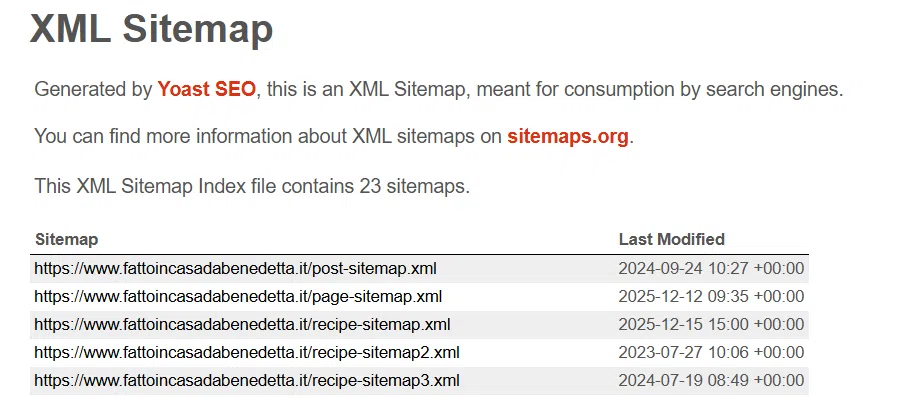
Generate an XML sitemap to give crawlers a map of your site with the useful links. Use a free third-party tool such as Yoast SEO to speed up (and even automate) the process. Remember to submit your sitemap to search engines through Google Search Console and Bing Webmaster Tools.
Site security

Build a secure, trustworthy website by installing an SSL certificate (short for Secure Sockets Layer) and making sure your site uses HTTPS. Follow Google's guidelines for moving from HTTP to HTTPS to keep the risk to your search engine optimisation work to a minimum.
Page speed

Build a website that loads quickly by following best practice such as image compression, code minification, browser caching and using a content delivery network (CDN). Use Google's PageSpeed Insights tool to get specific recommendations for your site.
Page experience
Create a better browsing experience by improving the accessibility and usability of your site. For example, use text and background colours with good contrast and a responsive design that adapts to the device, whether desktop, tablet or mobile.
Structured data
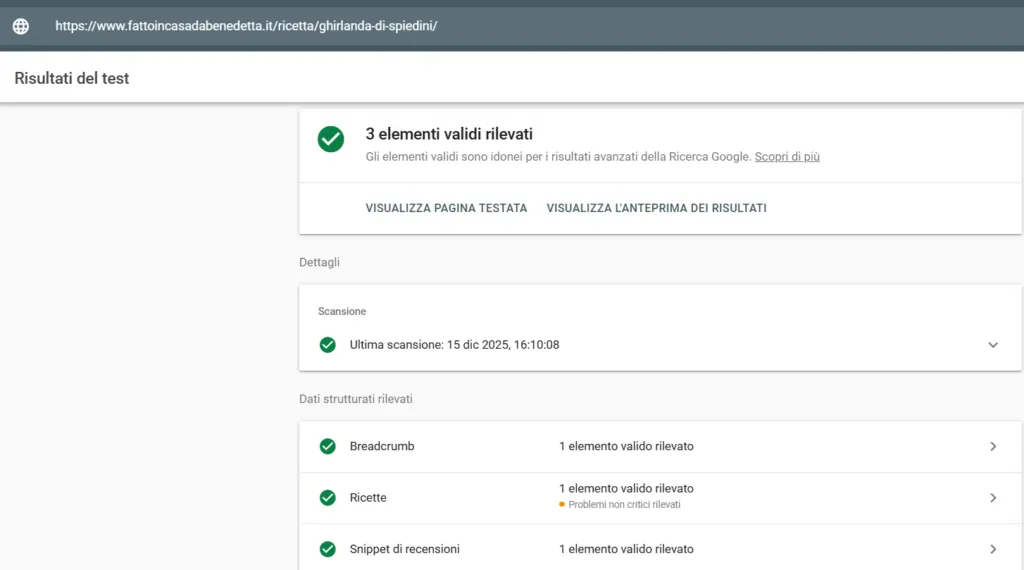
Add structured data to URLs where possible to give search engines more context. Use Google's free Structured Data Markup Helper, together with the Rich Results Test, to create and check your markup.
Find out more about this part of SEO in our technical SEO guide.
Chapter 6: Local SEO basics
Learn the basics of local search engine optimisation:
- Definition
- Why it matters
- Optimisation
Or skip to the next chapter on answer engine optimisation, or SEO for AI.
What is local SEO?
Local SEO improves visibility in localised search results for:
- Websites
- Local directory listings, such as Google Business Profile.
The most common local search optimisations include:
- Claiming local listings, such as Bing Places, Apple Maps and Google Business Profile
- Keeping your name, address and phone number consistent across all listings
- Producing unique, localised content, such as "electrician in Manchester"
- Attracting genuine online reviews on local listings
- Building a localised backlink profile.
Why does local SEO matter?
Local SEO matters because it helps people, from consumers to business buyers in B2B, find something in a specific area, whether that is an emergency plumber, a well-reviewed restaurant or a family-friendly day out.
From a business point of view, local search optimisation helps you:
- Build brand awareness
- Increase visits to your premises or shop
- Generate leads or bookings.
Even businesses that operate globally can benefit from local SEO. Local listings, such as a Google Business Profile with photos, reviews and address details, build trust and authority by showing that you are a real business.
How to do local SEO
Here is how to get started with local SEO:
Add the essential details (NAP)
Your name, address and phone number (also known as NAP) are essential for local search engine optimisation, because search engines use this information to understand your business's location and contact details.
People also use this information to:
- Book an appointment
- Get directions
- Find out more about a brand.
Businesses should include their NAP in a few places on their website:
- Footer (if you have several locations, you can show your head office or main branches)
- Contact page
- Locations page (if you have more than one location).
For the best results, include your opening hours too.
Claim your local listings
Next, claim or create the following local listings:
- Google Business Profile
- Bing Places
- Apple Maps
There are many other local listing sites you can use, such as:
- Yelp
- Yell
- Thomson Local
Just remember that every listing you add is one more listing to manage.
That is why most businesses, especially those with several locations, invest in local listing management software, which lets you push a single update (a change of opening hours, for example) to every listing.
For the best results, consider claiming or creating profiles on social networks such as Facebook, LinkedIn, Instagram and X.
Here are some examples of these tools:
- Birdeye
- Moz Local
Keeping your local profiles up to date, for example by updating opening hours for bank holidays, sharing offers or replying to reviews, will help your business perform better and appear in local search results.
Ask customers for reviews
Reviews play a key role in the buyer's journey.
Whether it is a family weekend away or a quote for a garden patio, people look for a business they can trust, and to judge that they turn to reviews.
People read reviews in several places, including:
- Your website
- Local listings
- Mentions of you on other websites
Although attracting online reviews is a team effort, from marketing to customer experience to the product or service itself, marketers can take a few steps to generate more reviews.
For example, you can:
- Use traditional marketing, such as business cards
- Use email marketing, for example an automated email after a purchase
- Use social media, for example a post asking for feedback.
Bear in mind that some local directories, such as Google Business Profile, prohibit incentivised reviews. For example, you cannot offer someone a free product, a gift card or entry into a prize draw in exchange for a review.
Target localised keywords
Another core part of local search SEO is targeting localised keywords, such as:
- electrician in manchester
- gluten free bakery london
- water park near me
Localised keywords are similar to non-localised ones. They target a specific intent, but the intent is local. Instead of browsing the best water parks, someone wants to find one nearby.
With localised content, the most common mistake we see businesses make is creating duplicate content. Instead of writing a unique page for each service area, the business creates pages where the only difference is the service area.
To succeed with this tactic, you need unique content. Here are some ways to make it unique:
- Highlight what is distinctive about the area, such as landmarks or events
- Include location-specific photos, such as pictures of your building
- Address issues specific to the area (where relevant).
Find out more about local search in our local SEO guide.
Chapter 7: SEO for AI basics
Learn the basics of optimising for AI search engines:
- Definition
- Why it matters
- Optimisation
Or skip to the next chapter to learn about SEO analytics.
What is SEO for AI?
SEO for AI, or answer engine optimisation, improves a brand's visibility in answer engines, including:
- ChatGPT
- Perplexity AI
- Gemini
Effective optimisation tactics include:
- Practising search engine optimisation
- Producing strong content that includes data, interactive elements and more
- Improving brand awareness and reputation.
Why does SEO for AI matter?
SEO for AI matters because the use of artificial intelligence is growing: 1 in 10 people use it mainly for searching online. While traditional search engines such as Google still dominate search, the growth of tools such as ChatGPT has no precedent.
Businesses adopting answer engine optimisation now are securing a competitive advantage. They are also doing SEO, which is what gets a site into the answers of answer engines in the first place.
Note: using artificial intelligence for SEO matters too. With AI platforms such as ChatGPT, businesses can speed up SEO tasks such as generating schema markup and working out search intent.
How to do SEO for AI
Here is how to get started with SEO for AI:
Master the SEO basics
Websites that practise search engine optimisation are cited or mentioned more often in answer engines than websites that do not. That is why webmasters need to master the basics of SEO before exploring answer engine optimisation.
You can use this guide to learn how to get started with SEO.
Increase the value of your content
Generic content does not work for answer engines.
People use answer engines to find specific answers, whether that is a training plan for the colder months or a holiday plan for a family that loves the outdoors and cheap days out. And answer engines look for detailed content to answer those questions.
Make your content more detailed and more valuable:
- Include data, such as figures from internal or external research
- Create resources, such as interactive tools or guides
- Give specific advice, such as "Do 10 star jumps..."
Remember to apply other SEO content best practice too, such as using headings, short paragraphs, lists and tables to make the content easy to skim, and working target words or phrases into the text.
Build a trustworthy online brand
Here you will reuse optimisations from other areas, such as:
- Off-page SEO, by building a trustworthy backlink profile
- Local SEO, by claiming local listings
You can use the earlier chapters of this guide to explore these topics in depth.
Find out more about AI search in our SEO for AI guide.
Chapter 8: SEO analytics basics
Learn why SEO analytics matters when you put the basics of search engine optimisation into practice:
- Definition
- Why it matters
- Optimisation
Or skip straight to the next chapter on how to get started with search engine optimisation.
What is SEO analytics?
SEO analytics tracks, measures and evaluates your SEO performance. Google Search Console and Google Analytics 4 offer a free way to monitor rankings, traffic, conversions and other useful SEO metrics, and they are widely used SEO analytics tools.
Why does SEO analytics matter?
SEO analytics matters for several reasons. For example, it lets you:
- Run a goal-driven SEO strategy by tracking and measuring your performance
- Understand your on-page, off-page and technical SEO performance
- Measure the return on investment (ROI) of search engine optimisation
- Make data-driven decisions to improve your SEO strategy.
SEO analytics shows you what works, what does not and what to do next. It also helps you prove the value of SEO.
How to do SEO analytics
Here is how to start using SEO analytics:
Tools

Use free platforms such as Google Search Console and Google Analytics 4 to track your SEO work. Google Search Console gives you data on position, impressions and clicks. Google Analytics 4 provides traffic and user metrics, such as bounce rate, time on page and more.
Metrics
Choose the most relevant metrics to measure the success of your SEO strategy. Avoid relying on too many vanity metrics and focus on the data that affects your business in a meaningful way, such as the number of leads or sales coming from organic traffic.
Goals
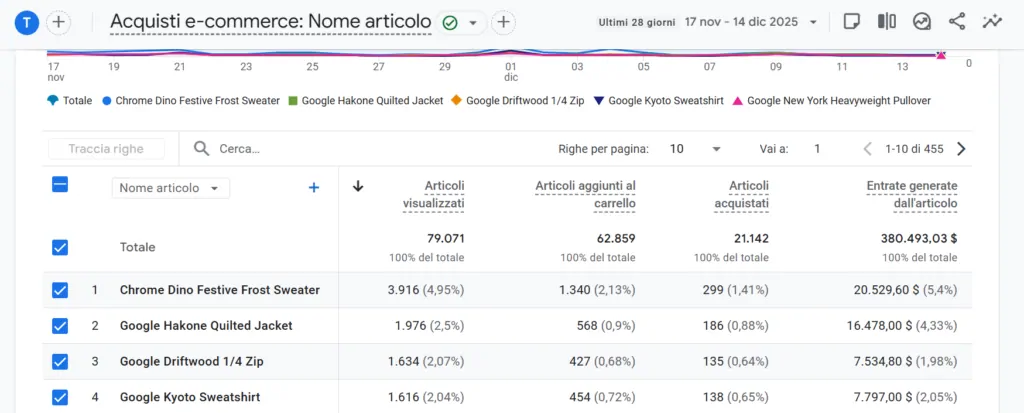
Set SEO goals based on your tools and metrics. Understand what your company's stakeholders expect from search engine optimisation and use that as the basis for SMART goals: specific, measurable, achievable, realistic and time-bound.
Analysis
Set regular intervals to review your SEO performance (bear in mind that SEO can take three to six months to work). Look for trends and outliers, taking seasonal factors into account, to work out what is working and where to improve.
Find out more about tracking and measuring SEO in our SEO analytics guide.
How to get started with SEO basics
If you are ready to put all of the above together, here is a short list to start from:
- Read Google's guide to getting your site into Google's search results
- Connect your website to Google Search Console and Google Analytics 4
- Keep your knowledge up to date with reliable guides, videos and blogs (such as ours).
Then put what you have learnt into practice on your website and measure your performance with the tools mentioned above. If you want more guidance, have a look at our SEO podcasts and SEO FAQs for answers to the most common questions about SEO.
Start applying SEO basics to your site
You now know the basics of SEO. The next step is to put SEO into practice on your own site, and we at Visilay can help. From rank tracking to SEO content, we can put together a service that fits what you need.
If you want a more complete approach, our professional SEO services include full SEO audits and tailored strategies.
Want to improve your SEO strategy? Get in touch to find out how we can help you generate traffic, increase conversions and reach your goals.
