
In B2B, a well-structured landing page lets you collect qualified leads to feed into your pipeline. To build a landing page that actually works, you need to look after several things: the structure and its essential elements, the copy (so it persuades), and the consistency with the ad or email that brought people to the page.
In this guide we have collected the processes and practical tips to follow when you plan and build a landing page. At the end you will also find a checklist you can run through quickly.
What is a B2B landing page (and how it differs from B2C)
B2B and B2C are two different worlds: in the first, the exchange happens between two companies; in B2C, you sell to the end customer. The differences go beyond the target and extend to other aspects such as the sales cycle.
We need to keep these differences in mind when we structure a landing page for B2B. Here are a few key points:
- One goal: the purpose of the landing page is the conversion (for example: a demo, a quote request, a download or a sign-up).
- A message aimed at an ICP (Ideal Customer Profile): this means addressing a specific sector, role and pain point.
- Several stakeholders: the page has to inform and reassure, bearing in mind that the decision will be made by several people in the team.
- A sales cycle that is not instant: since the sales cycle is longer, it makes sense to measure a landing page's success in qualified leads and progress through the funnel rather than immediate sales.
Another important element, and one that is often underestimated, is the consistency of the whole journey: from the starting point to the moment people land on the page.
Here is a good example:
- LinkedIn ad: the ad invites people to get a resource such as "White Paper: 5 strategies to increase B2B leads".
- landing page structure: a page consistent with the ad headline that presents the content briefly (bullet points work well), uses a short form (for example: name, email, company) and a "Download now" CTA. No distractions.
Now let's look at the practical and technical advice for structuring a landing page that performs.
Strategy before design: the 10-question brief
How do you create an effective B2B landing page? It helps to start from 10 key questions that will act as a compass while you build the page.
- ICP: the key elements include sector, company size, role and geography. Our guide to creating an ICP goes into more detail.
- Primary pain point to solve.
- Offer: the purpose of the page must be clear, for example a lead magnet, a demo, an audit or a free trial.
- Goal: how will we measure the page's performance? Some examples: MQLs (Marketing Qualified Leads), SQLs (Sales Qualified Leads) or meetings booked.
- Single message: value proposition and a quantifiable proof point.
- Typical objections: the page should answer the most common objections in advance, such as price, integrations, timescales and security.
- Trust signals available: case studies, logos of clients you have worked with, reviews, certifications.
- Consistency with traffic channels: how do we send traffic to the page (ads, email or organic)? The message must match what people will find on the landing page.
- Conversion event to track: there are several tracking systems you can use to measure conversions (for example GA4, the Meta pixel, your CRM).
- SLA with Sales after the conversion: set up the next steps in advance, with response times, scripts and the sequence to follow once someone converts.
A winning wireframe for a B2B landing page
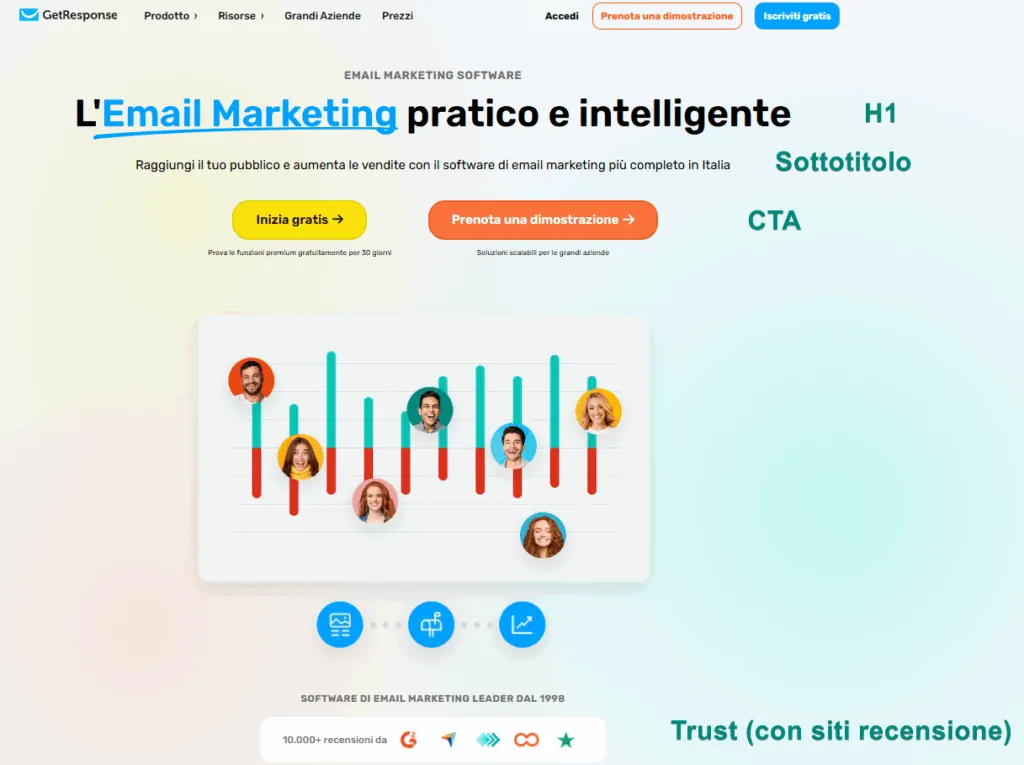
One of the most important sections of a landing page is the above the fold area, the part of the page visible without scrolling down. It has the biggest impact, and the reader's next action depends on it: will they stay on the page or close it without reading further?
Some practical tips for the above the fold section:
- A clear and consistent H1: the headline must confirm that the visitor has landed on the right page and stay consistent with the previous step (ad, email, organic result). The headline can lean on the benefit.
- Subheading: explains how and for whom.
- Hero visual: depending on your needs, it can show a product mockup, a report cover or a short video (1-2 minutes, with subtitles).
- Primary form/CTA: "Book a demo" / "Download the report".
- Micro-trust (visible straight away): client logos or certifications and badges that build confidence.
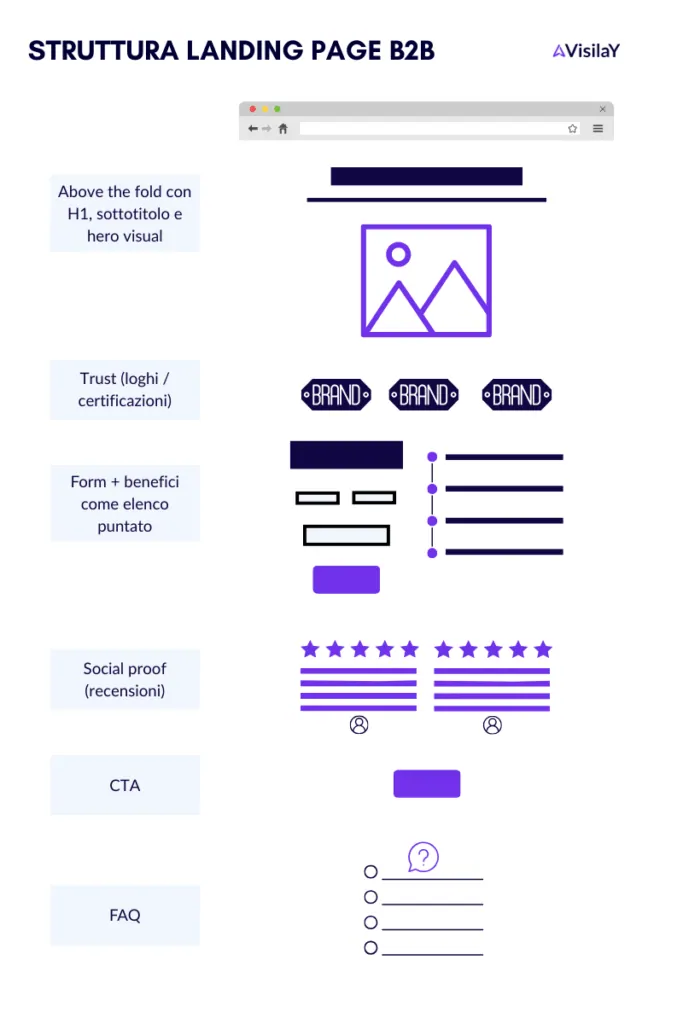
Just below the fold come the other sections of the landing page, which need the same care. Here is an example of the sections and the order to follow:
- Benefits in 3-5 bullet points (tied to business KPIs: for example lower costs, risk or time, or higher revenue).
- How it works (3 numbered steps): simple, concrete, measurable.
- Social proof: 1-2 testimonials with name/role/logo, plus a short case study showing the results achieved (e.g. "+150% leads in 90 days").
- Integrations/IT (for SaaS): SSO, API, GDPR, audit log, data residency.
- Repeated CTA.
- Targeted FAQs (3-6) to deal with common objections.
- Slim footer with a privacy link and no escape menu.
What about the elements that are not on the list? As you can see, there is no menu: the usual header menu is removed from the landing page so that nothing distracts the visitor.
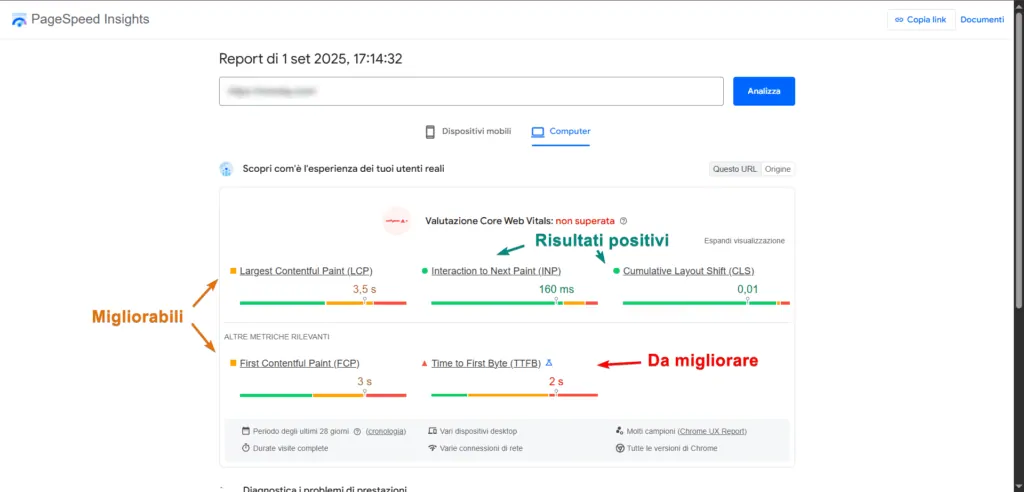
On the performance side, it is worth checking the page's Core Web Vitals before publishing it. For good results you need:
- LCP ≤ 2.5s;
- INP ≤ 200ms;
- CLS ≤ 0.1.
To improve performance, use WebP images, turn on lazy loading for images, minify JS/CSS, prefer system fonts or use preloading.
B2B copywriting: formulas, examples and microcopy
Once the structure of your landing page is defined, the next challenge is writing the copy.
Here are some pointers for each section.
H1
The H1 must be clear and specific. You can follow this formula:
[Action/Result] + [Specifics] + [Time/Method]
Example:
"Cut ERP implementation time by 30% in 60 days with our manufacturing accelerator."
Subheading
Focus on making clear for whom (who you are talking to) and how.
"Designed for CIOs and Operations Managers in manufacturing: initial assessment, pre-configured templates, on-site support."
Bullet points
Lists are one of the best ways to show benefits (framed in business terms).
- Operating costs down 15-25% thanks to workflow automation.
- End-to-end visibility of the supply chain (OT/IT) in a single dashboard.
- Simpler compliance (GDPR, ISO 27001) with a built-in audit trail.
CTA
CTAs must state clearly what the next step is:
- "Book a demo"
- "Download the white paper"
- "Request a quote"
- "Talk to a consultant"
Below you can see two CTA examples highlighted on the HubSpot website.

Microcopy
The rest of the copy on the page can be used to build trust.
- "No commitment. We will get back to you within 24 hours."
- "Free: instant access to the PDF."
- "Secure connection. We do not share your data."
Examples
Examples for three verticals (so you can build pages with different copy for each sector and audience):
- HR Tech (target: HR Director): "Cut time-to-hire by 40% with automated screening and DEI analytics."
- FinTech (target: CFO): "Reduce treasury costs by 18% with automatic reconciliation and cash forecasting."
- Cybersecurity (target: CISO): "Detect and block threats in under 60s with 24/7 managed XDR."
CTAs and design that convert
Beyond the copy, the placement and look of the CTAs matter too.
Here are some general tips, but remember that split tests (A/B tests) are always the way to check whether your choices work.
- High contrast and white space around the button.
- Key positions: above the fold + after the social proof section + at the end.
- One macro goal per page (if you have several variants, give each one its own page).
- Personalisation: if you target different sectors (for example with ads for each sector), you can use Dynamic Text Replacement (DTR) in the H1 and the CTA ("Demo for chemical companies" / "Demo for pharmaceutical companies").
Simple (and GDPR-compliant) forms
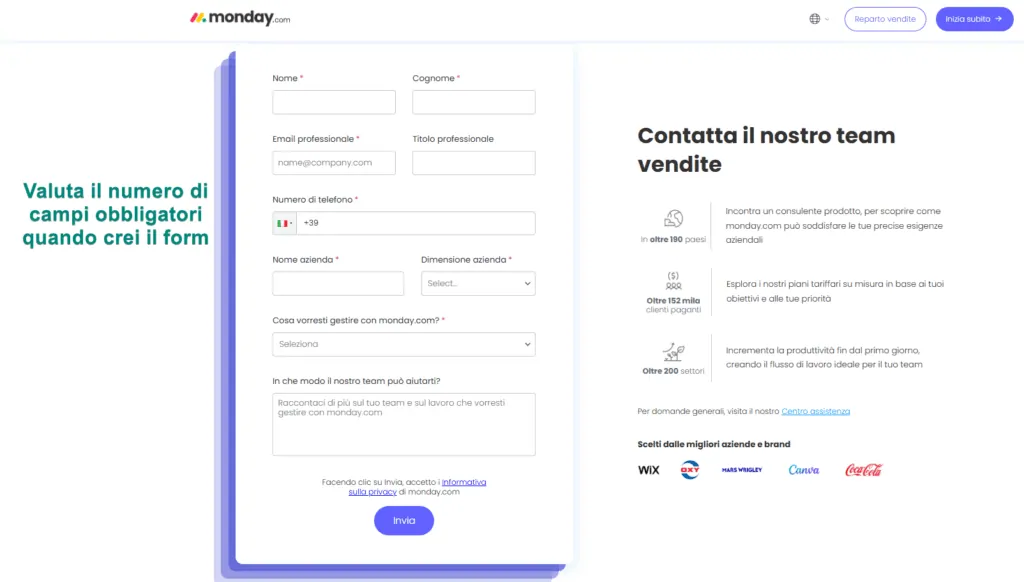
When we build a form, the aim is not to collect as much information as possible but to work out what is essential.
- TOFU (lead magnet): Name, business email, Company.
- MOFU (demo): the above plus Role, No. of employees (drop-down), Phone optional.
- BOFU (quote): the above plus Budget range optional and a notes field.
To improve usability and make life easier for visitors, use:
- Autocomplete and clear validation (with explicit error messages).
- Progressive profiling: ask for a few essential details at first, then collect more in later contacts.
- Visible privacy note: "We process your data in line with UK GDPR. You can unsubscribe at any time."
And after submission? Once the form is completed, people need to know that everything has gone through. You can choose to:
- show a thank-you page with the next steps (e.g. "Calendar to book the demo").
- send an email straight away with a link to the resource and double opt-in (where needed, for example to confirm the email address).
Trust: social proof and security signals
Here are some ideas for the social proof section:
- Testimonials with a quantified result and a logo/photo.
- Mini case studies (problem → solution → result).
- Client/partner logos (5-8 well known in your sector).
- Badges: ISO 27001, SOC 2, GDPR and cloud partners.
- Reviews on specialist sites (G2, Capterra or Trustpilot) if you have them.
Personalisation, segments and consistency
- Pages by vertical (e.g. "CRM for law firms", "CRM for insurers"). Building several versions of the landing page keeps the starting point (e.g. an ad) and the page more closely aligned.
- Pages by audience / role (CFO vs CIO): same product, different copy.
- Traffic → dedicated page: you can set up ad groups or email groups that point to dedicated pages (different versions of one landing page) so that headlines stay consistent.
- UTM strategy: use UTM parameters in your links to measure channel, campaign, content and query.

Does SEO matter for landing pages?
Many landing pages are built to be reached from ads or email campaigns and, in that case, they can stay noindex.
If you want organic traffic, on the other hand, you should also look after the page's SEO.
Essential on-page SEO: these are the elements to work on:
- Title
- Meta description
- H1: contains the keyword.
- H2: semantic variants of the keyword.
- URL:
/keyword/ - FAQ: add the 4-6 most useful questions and answers; you can use FAQPage schema.
- Video: if the page has videos, you can use VideoObject schema for rich snippets.
Supporting content (clusters)
Once the landing page is live, you can create supporting content and link internally from it to the landing page (your pillar content). It is worth reading up on B2B SEO strategies and the concept of topic clusters.
Performance and UX
Landing pages need to load fast. That means taking care of the technical side, and you can test page speed with tools such as PageSpeed Insights.
Here are some benchmarks.
- CWV targets: LCP ≤ 2.5s; INP ≤ 200ms; CLS ≤ 0.1.
- Page weight: < 1.5 MB (ideally < 1 MB).
- Images: WebP/AVIF, responsive, lazy loading for every image that is not above the fold.
- JS: remove unnecessary bundles, defer third-party scripts, prefer a tag manager.
- Fonts: system fonts, or preload with
font-display: swap. - Accessibility: check contrast, alt text, focus states and explicit form labels.
Measurement: KPIs, GA4 and CRM
Primary KPIs
- CR (Conversion Rate) = conversions/visits.
- CPL (Cost per Lead) = spend/leads.
- MQL% → SQL% → Win% (you can use different engagement metrics to define your MQLs).
- TAL (Time to Action Lead) = time between the conversion and the first contact from the sales team.
GA4 events (recommended)
view_pagewith UTM parameters and persona/vertical (where available).generate_lead(form submit).click_cta(for each CTA).video_start/video_complete.scroll_90for depth (tells you whether the page is read to the end).
CRM integration (HubSpot/Salesforce etc.)
Lead qualification is part of any set of lead generation strategies. Tools such as HubSpot have built-in lead scoring that lets you rank leads by score, and you can start scoring at this first stage based on the answers given in the form.
- Fields mapped 1:1 (avoid free-text fields in the form unless you need them: see the image below as an example).
- Lead source and campaign taken from the UTM parameters.
- Initial lead scoring (example):
- Decision-making role +20
- Company domain +10
- Target vertical +10
- Content engagement (100% of the video) +10
- Free email provider −20
- SLA with Sales: first contact within 24 hours (ideally 2 hours during office hours), 3 attempts across channels (email/phone/LinkedIn).

A/B testing: the roadmap to follow
A/B testing your landing pages is how you find out what works and what can be improved.
Here are the elements you can test, in order of priority:
- Offer (lead magnet vs direct demo).
- Headline (quantitative vs qualitative claim).
- Hero (video vs image).
- Form (3 fields vs 5 fields; optional vs required phone).
- CTA copy ("Book a demo" vs "Talk to an expert").
- Social proof (logo section above the fold vs halfway down the page).
Good practice:
- Test one variable at a time per page. Otherwise you will not know which change caused the difference.
- Make sure your numbers are meaningful (at least a few hundred visits per variant, depending on your rates).
- Log the results in a document, then reuse what works on other pages and channels.
3 landing page examples to inspire you (+ template)
1) SaaS demo for Operations Managers (manufacturing)
- H1: "Plan production without bottlenecks."
- Sub: "APS suite for manufacturing SMEs: up and running in 60 days."
- Hero: 8-second scheduling GIF highlighting a KPI (OTD).
- Bullets: lower WIP, OTD >95%, integration with ERP X/Y.
- CTA: "Book a demo" + microcopy "20 minutes, no commitment".
- Form (5 fields): Name, Business email, Company, Role, Current ERP (drop-down).
- Proof: Beta Ltd case → +22% OEE in 3 months, logo, quote from the Plant Manager.
- FAQ: timescales, data migration, operator training.
2) Lead magnet for Marketing Directors (ICT)
- H1: "B2B landing pages: 12 ready-to-use templates."
- Sub: "Wireframes, copy and a checklist to increase B2B leads."
- Hero: PDF mockup.
- CTA: "Download the kit" + microcopy "PDF + Figma. Free".
- Form (3 fields): Name, Business email, Company.
- Follow-up: email with the link + invitation to a hands-on webinar (within 48 hours).
- Retargeting: people who do not fill in the form → ad "Watch the 2-minute demo".
3) Cybersecurity audit (CISO)
- H1: "Find out where you are vulnerable in 7 days."
- Sub: "Rapid risk assessment across 12 critical controls, with a prioritised report."
- CTA: "Request the audit" + "We will call you back today".
- Form (4 fields): Name, Business email, Company, Domain to scan optional.
- Proof: ISO badge, cloud partners, 4.8/5 rating.
- FAQ: impact on systems, confidentiality, timescales.
Page template
You can start from this basic template and adapt it to your needs.
H1: [Service] for [Sector/Persona]: [Measurable result]
Sub: [Value proposition] for [role/vertical], with [method/time].
Hero: 60-120s video / Mockup / Resource cover.
Primary CTA: Book a demo / Download the report / Request an audit.
Bullets (3-5): specific business benefits.
"How it works" section: Step 1 → Step 2 → Step 3 (highlight the result).
Proof: logo section + 1 case study with a numerical result.
Integrations/IT: API/SSO/GDPR/ISO (if relevant).
Repeated CTA.
FAQ (3-6).
Footer: privacy, terms, contact details; no menu.
Pre-launch checklist
Now that we have covered the details, here is a checklist you can save and run through every time you build a new landing page.
Content and consistency
- H1 with a clear promise.
- Subheading: for whom + how.
- Relevant hero visual (subtitled video, if you use one).
- KPI-oriented benefit bullets.
- Visible social proof (logos/testimonials).
- FAQs on real objections.
- No escape links (menu, complex footer).
Form & CTA
- Max 3-5 fields at first contact; phone not required.
- CTA above the fold + at the end; action-oriented copy.
- Trust microcopy (free, timings, privacy).
- Thank-you page with a clear next step.
Technical
- Page weight < 1.5 MB; WebP/AVIF images.
- LCP ≤ 2.5s; INP ≤ 200ms; CLS ≤ 0.1.
- Mobile-first: touch-friendly elements, a form you can fill in with one hand.
- GA4 tag +
generate_lead,click_cta,scroll_90events. - UTM parameters on every campaign.
- Leads sent to the CRM with correct field mapping and lead source.
- UK GDPR: privacy notice, consent (for newsletters), clear opt-out.
30-60-90 day plan to scale
Here is an operating plan you can follow to start testing and improving your landing pages straight away.
Days 1-30
- Build the base landing page and one variant to A/B test the headline.
- Connect GA4 + CRM; agree an SLA with the sales team.
- Launch 1 priority campaign (e.g. LinkedIn Lead Gen pointing to your landing page).
Days 31-60
- Test 3-field vs 5-field forms and video vs image.
- Add retargeting with an alternative offer (demo ↔ content).
- Publish 2 cluster articles and link them to the page (SEO).
Days 61-90
- Personalise for 2 verticals (audience/role), with duplicate pages and tailored copy.
- Start lead scoring and automated nurturing sequences.
- Update your social proof with case studies with numbers and run PR on your best case.
FAQ on creating a B2B landing page
Enough to answer doubts and motivate the action. Break up walls of text with bullet points, steps and FAQs, and move technical details to data sheets or white papers.
It depends on how complex the offer is and how warm the audience is. Cold and complex → more structured content. Warm and simple → a lean page. Check with an A/B test.
Yes, but look after speed, relevance and intent. If the page was built for Ads, consider noindex at first and create a separate SEO pillar page (or an SEO version of the landing page).
Start with the minimum (3-4). Add more gradually through progressive profiling.
CPL, MQL→SQL, sales response time, lead quality as rated by the sales team, win rate at 60-90 days.
Visilay helps you build landing pages that work
Building a B2B landing page takes real work, and the job does not end once the page is designed and published. If you want your landing page to bring in new leads, you need to measure the results and keep improving the page.
At Visilay we can help you build your website from scratch or develop individual landing pages, and set up Google Ads and LinkedIn campaigns to drive traffic to them. Get in touch today to book a consultation and see whether we are a good fit.
