
How many tools do you need to do lead generation well, and which ones? There is no single answer. It all depends on your business, your target market and your goals.
There are plenty of tools that help us generate leads, qualify and segment them, and move them towards conversion. They range from tools that help us find new contacts and segment them to CRMs that bring every contact we have ever had with a lead into one platform.
Since these tools cover many different uses, the starting point is the type of tool you need.
What is lead generation?
Lead generation is the process of getting information about leads, people interested in our product or service. When we talk about generating leads, we mean collecting contact details.
That information can be collected in different ways, for example through a form on our website. As we will see, there are inbound and outbound systems for collecting leads.
What is lead generation for?
New leads are what a company needs to grow. What matters even more, though, is getting qualified leads: people who are close to our ideal customer and therefore more likely to buy.
A well-structured lead generation strategy can raise the conversion rate.
How the lead generation process works
We have mentioned lead acquisition and qualified leads. Those two alone show that lead generation is not a single step. Generating leads is a strategy made up of several stages, and it often needs action across several different channels.
For example, we said that one way to generate leads is to collect contact details with a form. In that scenario, some important pieces are missing:
- How do people reach the form?
- How do we reach people to let them know they should fill it in?
These are just some of the questions to ask before putting a lead generation system in place.
Once we have the lead's details, there are further points to consider:
- How do I store the data I have collected?
- How do I tell one lead from another and assign a score?
This hypothetical scenario shows that lead generation is more than finding a tool to get new leads: the stages before and after matter as well.
A lead generation strategy should cover several steps:
- identifying the target audience and building buyer persona profiles;
- a strategy to attract traffic (SEO, social media, ads, etc.; at this stage the content marketing strategy carries a lot of weight);
- a lead capture system;
- a scoring system to qualify leads;
- nurturing strategies;
- conversion;
- analysis of results.
What is lead generation software?
With so many steps in a lead generation strategy, no single type of tool covers the whole thing.
There are tools that help us capture inbound contacts, turning interested traffic into leads, and tools that help with outbound lead generation, which lets us reach prospective customers.
The first category, inbound, includes tools that add a form or popup to our website to collect an email address, or live chat widgets.
The second, outbound, includes tools such as Leadinfo, which gathers data on the visitors to our site, or Hunter, which finds company email addresses.
To see how these tools work, let's go through the types.
Types of lead generation software
Every action that captures the interest of prospective customers and puts us in touch with them falls under lead generation.
A lead is anyone who shows interest in what we offer (products or services).
Lead generation, however, should not be treated as a way to collect as many leads as possible, but as a structured strategy that focuses on qualified leads from the moment of capture.
Lead generation depends on using the right tools. Choosing them is hard, though, especially because the sales process is not linear and there are many touchpoints to consider.
To help you find the best tools, we have grouped them by use case.

Before looking in detail at the features of the most complete tools, here is a wider overview of the options on the market. Prices are the starting prices on each vendor's official pricing page (checked September 2026) and change often, so check them before you buy.
| Software | Category | Free plan / free trial | Price (from) |
|---|---|---|---|
| Leadinfo | Identify website visitors and get contact details | ✅ | €69 a month |
| Leadfeeder | Identify website visitors and get contact details | ✅ | €79 a month |
| Leadfinder | Find email contacts | ❌ | $199 a month |
| VisitorQueue | Identify website visitors and get contact details | ❌ | $31 a month |
| Hunter | Find email contacts | ✅ | $34 a month (billed yearly) |
| Skrapp | Find email contacts (including from LinkedIn) | ✅ | $29 a month |
| AeroLeads | Find email contacts (including from LinkedIn) | ❌ | $39 a month |
| Datanyze | Find email contacts | ✅ | $21 a month |
| ActiveCampaign | Email marketing | ✅ | $15 a month |
| Mailchimp | Email marketing | ✅ | $13 a month |
| Brevo | Email marketing | ✅ | $9 a month |
| MailerLite | Email marketing | ✅ | $9 a month |
| Sender | Email marketing | ✅ | $7 a month |
| GetResponse | Email marketing | ✅ | $15.58 a month (billed yearly) |
| HubSpot | CRM and integrated marketing and sales platform | ✅ | $800 a month (Marketing Hub Professional) |
| Salesflare | CRM for small and medium-sized businesses | ✅ | $29 per user a month |
| Salesforce | CRM and integrated marketing and sales platform | ✅ | $25 per user a month |
| Klaviyo | CRM and integrated marketing and sales platform | ✅ | $45 a month |
| Zendesk | CRM, customer service platform and live chat | ✅ | $19 per agent a month |
| Elementor | Opt-in pages and lead generation forms (WordPress plugin) | ✅ | $49 a year |
| WPforms | Lead generation forms (WordPress plugin) | ✅ (WPforms lite) | $49.50 a month |
| Shopify | Ecommerce builder | ✅ | £19 a month (billed yearly) |
| Google Forms | Forms and quizzes | ✅ | free |
| OptinMonster | Lead generation forms (WordPress plugin) | ❌ | $7 a month |
| ClickFunnels | Sales funnels (with built-in page builder) | ✅ | $81 a month |
| Funnelkit | Sales funnels (with built-in page builder) | ❌ | $99.50 a month |
| LeadPages | Landing pages with lead generation forms or popups | ✅ | $37 a month |
| LiveChat | Website live chat and chatbot | ✅ | $20 a month |
| Callpage | Call booking widget | ✅ | $31 a month |
| Limecall | Call booking widget | ✅ | $35 a month |
| Calendly | Appointment booking and scheduling | ✅ | $10 a month |
| Doodle | Appointment booking and scheduling | ✅ | $132 a year |
| Zapier | Automation | ✅ | $19.99 a month |
| Make | Automation | ✅ | $9 a month |
| LinkedIn Sales Navigator | Automation and LinkedIn contact identification | ✅ | £94.99 a month |
Now let's look at the most useful tools in each of these categories:
- tools to identify visitors and find decision makers' contact details;
- tools to find email contacts (so-called email finders);
- email marketing tools;
- CRMs to organise all your contacts;
- tools to build forms, opt-in pages, landing pages and whole ecommerce sites (to generate leads through the website);
- tools for live chat, call booking and scheduling;
- automation tools.
As you will see, some of the tools we have picked, HubSpot for example, fall into several categories and can be used for more than one purpose.
Website visitor identification software
In B2B, qualifying leads is essential. For this we can use tools that extract data from the traffic reaching our website.
Here are some examples.
Leadinfo
Leadinfo collects a lot of data through an IP intelligence system that identifies traffic. With it you can identify the companies visiting your website and trace their contact details.
One of Leadinfo's main strengths is integrations: the tool has more than 70 native integrations with CRMs (such as HubSpot and Salesforce), email marketing tools such as ActiveCampaign, LinkedIn Ads and many others (you can see all the integrations on their site).
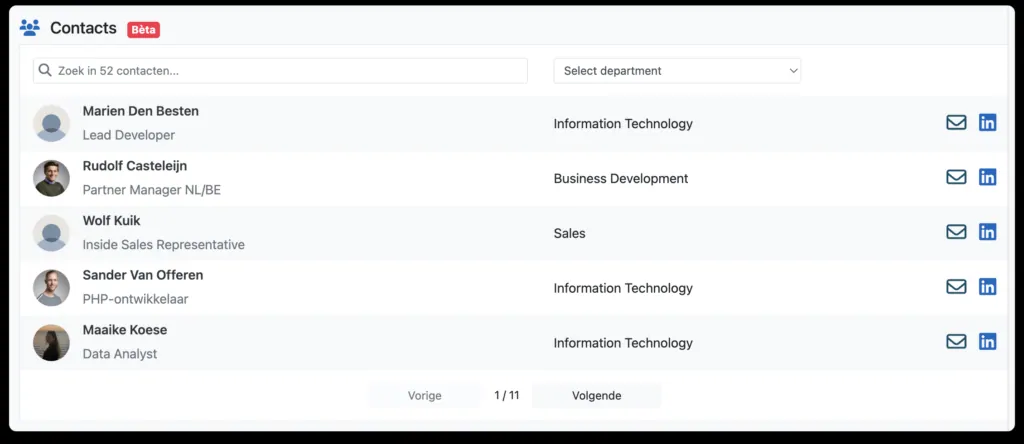
Leadinfo's features include:
- real-time visitor identification;
- a large database of decision maker data;
- lead scoring to segment leads automatically;
- many integrations;
- recording of visitors' interactions with the site, to understand their behaviour and extract useful data (Scale and Pro plans only).
Leadinfo plans and pricing
- Starter at €69 / month;
- Scale at €159 / month: on top of the Starter features it adds more integrations (including GA4 and LinkedIn Ads);
- Pro at €359 / month (more integrations and longer data retention).
The plans differ in the number of native integrations available, and the Scale and Pro plans keep visitor behaviour tracking data for longer (7 and 14 days respectively).
The price also depends on how many companies you want to identify. You can start with a 14-day free trial and then get a personalised quote.
Leadfeeder
Leadfeeder is one of the most used tools for identifying the traffic to your website. It works like this:
- a script tracks the site and identifies the companies that visit it;
- it gives us access to those companies' contact details;
- it integrates with CRMs so we can contact qualified leads.
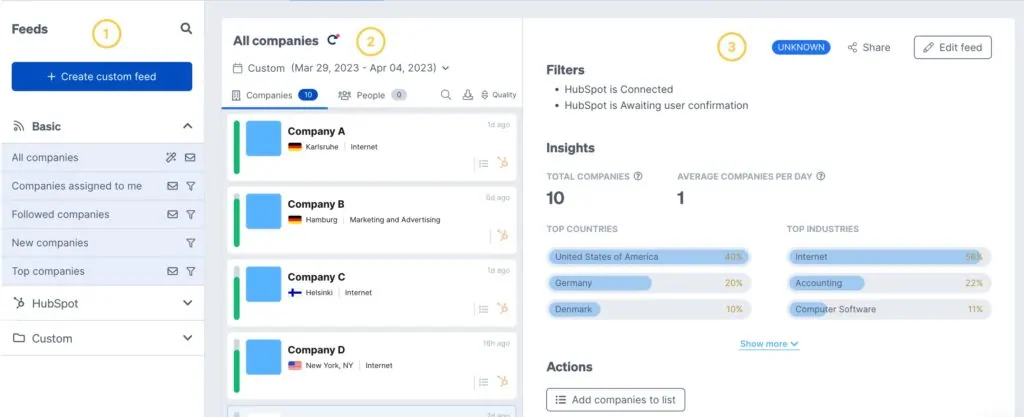
Another useful feature is segmenting leads by parameters such as company headcount and industry. It also helps with lead scoring, letting us assign a score based on activity and engagement while browsing our website.
Leadfeeder's main features are:
- identifying site visitors and getting their contact information;
- tracking visitor activity on our site;
- CRM integration.
Leadfeeder plans and pricing
- free Lite plan with up to 100 identified companies a month, good for trying the tool;
- paid plans from €79 a month on annual billing.
Email finder software
Several tools help us find contact information, and prospects' email addresses in particular. Here are some of the most used.
Hunter
Hunter also uses AI to verify contacts and add details to them. The tool finds contacts from a company name or website. One of its most useful features is an email address verification score, which tells us whether our emails are likely to be delivered.

Hunter plans and pricing
- free, with limited monthly credits;
- Starter from $34 a month, billed yearly;
- Growth from $104 a month, billed yearly;
- Scale from $209 a month, billed yearly;
The plan you choose sets the number of searches and verifications available.
Skrapp
Another tool for finding prospective leads' email addresses is Skrapp. It is particularly useful for finding contacts through LinkedIn. It provides verified emails sourced from LinkedIn (including Sales Navigator) as well as other contacts stored in its database.
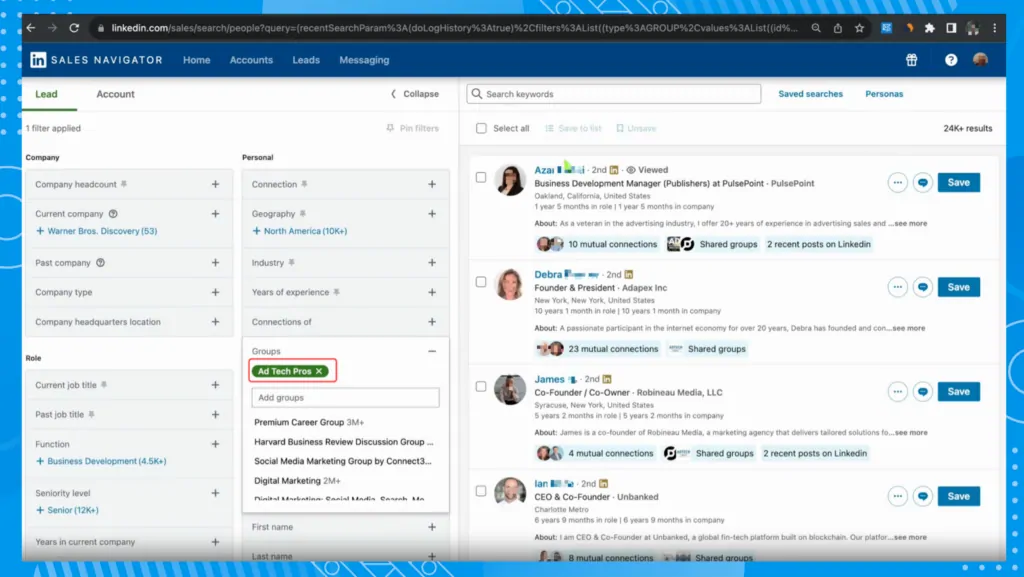
Like other tools, it also verifies emails to check whether the addresses are still valid.
Skrapp plans and pricing
- free plan with 50 credits;
- Professional from $29 / month, with 2,000 credits a month;
- Enterprise from $262 / month, with 50,000 credits a month.
The plans differ in features and in the credits available for finding and verifying emails.
Leadfinder
Leadfinder is another tool for identifying leads and collecting email addresses. It gives access to a large database (over 300 million verified companies). Like other tools of this kind, Leadfinder has an email validation system that checks addresses before you send.
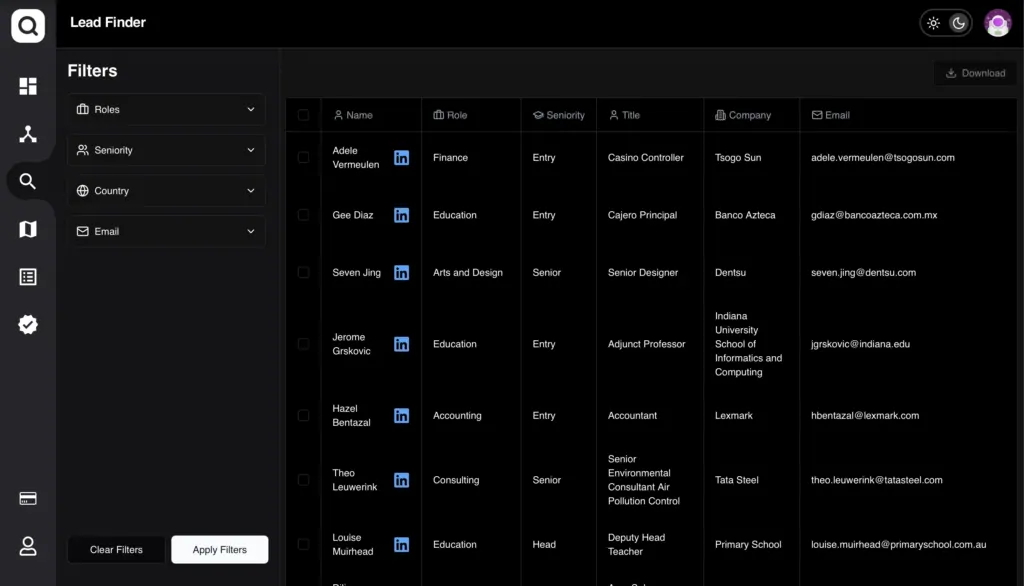
Leadfinder can also find email addresses from a list of websites with its website crawler feature.
Leadfinder plans and pricing
Leadfinder's monthly licences are:
- Growth from $199 a month: does not include the email validator, website crawler or map extractor;
- Pro from $299 a month: does not include the map extractor;
- Enterprise from $399 a month: includes every feature.
Email marketing software
There are many tools built around email marketing. They are increasingly complete: as well as creating and sending personalised emails, they handle advanced audience segmentation and different types of email (from newsletters to sales emails).
Here are the most used.
ActiveCampaign
ActiveCampaign is one of the most used email marketing tools, although it is really a broader platform that can also serve as a CRM and for automation.
For email, it allows advanced yet easy customisation thanks to a drag&drop editor and ready-made templates.
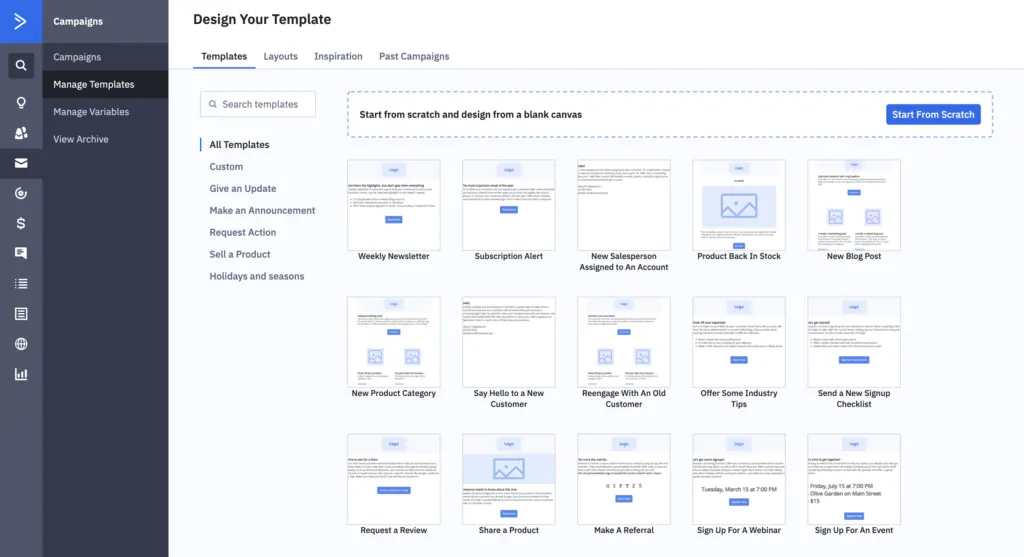
Among the most useful features are email deliverability monitoring and automations (including AI-assisted ones). The ready-made basic automations are also a big help for anyone using these systems for the first time.
ActiveCampaign plans and pricing
- Starter from $15 a month;
- Plus from $49 a month;
- Pro from $79 a month;
- Enterprise from $145 a month.
Each plan has limits on email sends and automations. The Starter plan, for example, allows only 5 actions per automation. Integrations with some CRMs (such as Salesforce) are reserved for the Enterprise plan.
Mailchimp
Like ActiveCampaign, Mailchimp combines email marketing and automation. The platform can also be used to run SMS campaigns.
Starting from a ready-made template, we can customise emails and set up A/B tests to try different combinations (for example changing the subject line or the body of the email).
One of Mailchimp's useful features is segmentation, which can also be based on users' behaviour on our site or their interactions with email campaigns (a feature available only on the Standard and Premium plans).
Mailchimp plans and pricing
- free plan, up to 250 contacts;
- Essentials from $13 / month;
- Standard from $20 / month, for up to 500 contacts;
- Premium from $350 / month.
Prices rise with the number of contacts, and the monthly send allowance is a multiple of your contacts that grows with the plan. SMS marketing and other features are available as paid add-ons.
CRM
In B2B, a CRM is indispensable for keeping accurate track of all the data on each lead. A CRM lets you segment contacts properly, get reports and forecast future buying behaviour. Here are some of the most used CRMs.
HubSpot
HubSpot is a complete platform with solutions for lead generation, contact management and analysis.
One of HubSpot's products is an AI-assisted CRM. It brings all customer information together and allows very advanced segmentation, which we can then use in automations.
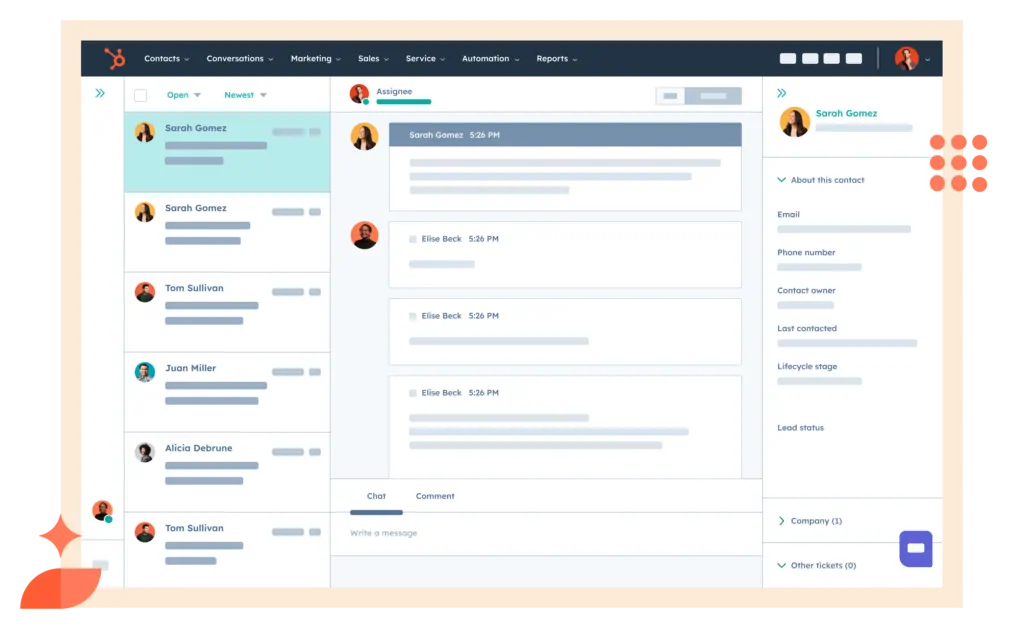
The CRM connects to Marketing Hub, a central platform whose features range from email marketing to analytics and include landing page creation, automation tools and social media integrations.
HubSpot Marketing Hub plans and pricing
- Professional from $800 / month (3 core seats included)
- Enterprise from $3,600 / month (5 core seats included).
Salesflare
Salesflare is a CRM designed for small and medium-sized businesses. Its advantage is that it combines several functions and keeps management simple.
In particular, it:
- lets you build a sales pipeline to follow the process step by step;
- includes email follow-ups;
- integrates with LinkedIn and can also find prospective leads' email addresses.

Salesflare plans and pricing
- Growth from $29 per user / month;
- Pro from $49 per user / month
- Enterprise from $99 per user / month (minimum 5 users).
These are annual billing prices; monthly billing costs more. There is a 30-day free trial. The Growth and Pro plans have limited email search credits, and the Enterprise plan also includes data migration and help with setting up and using the tool.
Klaviyo
Klaviyo is a CRM focused on B2C sales. This all-in-one platform includes marketing tools (such as managing and sending email and SMS campaigns), a system for managing existing customers (the customer hub, built to integrate with Shopify), ticketing to handle requests, and advanced reporting and analytics.

Klaviyo plans and pricing
- Free: a free plan limited to 250 profiles.
- Email: from $45 a month, with integrations.
- Email + SMS: from $60 a month, with more email and SMS credits and advanced segmentation.
Analytics tools can be added to these plans from $100 a month. Prices depend on the number of profiles you want to manage.
Form and landing page software
This category covers every tool that lets us build opt-in pages and forms for lead generation.
It is a very broad category, ranging from tools tied to specific CMSs, for example:
- Elementor, a WordPress page builder for creating forms and designing every page of the website;
- WPForms and OptinMonster, WordPress plugins for building forms or popups that ask for contact details.
- Shopify, a platform for building ecommerce sites.
Then there are standalone tools such as Google Forms and ClickFunnels.
Let's look at some examples in this category.
Elementor
Elementor is more than a tool for building lead capture forms: it is a full page builder for customising the look of a WordPress site. Unlike a theme, a page builder lets you change every element of the site and build complex pages easily with drag&drop.
One of Elementor's big advantages is its library of customisable templates. With ready-made elements you can build, for example, a popup to collect contact details.

Elementor plans and pricing
- free Elementor plugin (limited features);
- Essential from $49 / year;
- Advanced Solo from $99 a year.
There are also the Advanced and Expert licences, which cover more websites: up to 3 and up to 25 respectively.
Shopify
Shopify is one of the most used platforms for building ecommerce sites. Globally, it ranks near the top for usage (10.56%), behind WooCommerce (39.05%). (2024 ecommerce platform usage data, Statista.)
Shopify lets you build an ecommerce site with a simplified builder. Because the platform is built around ecommerce, it already has everything needed to launch a fully online business or to connect in-store sales (it also offers a POS system).
Shopify can be extended with many apps, such as Shopify Forms, which lets you add forms to your store and segment customers directly.
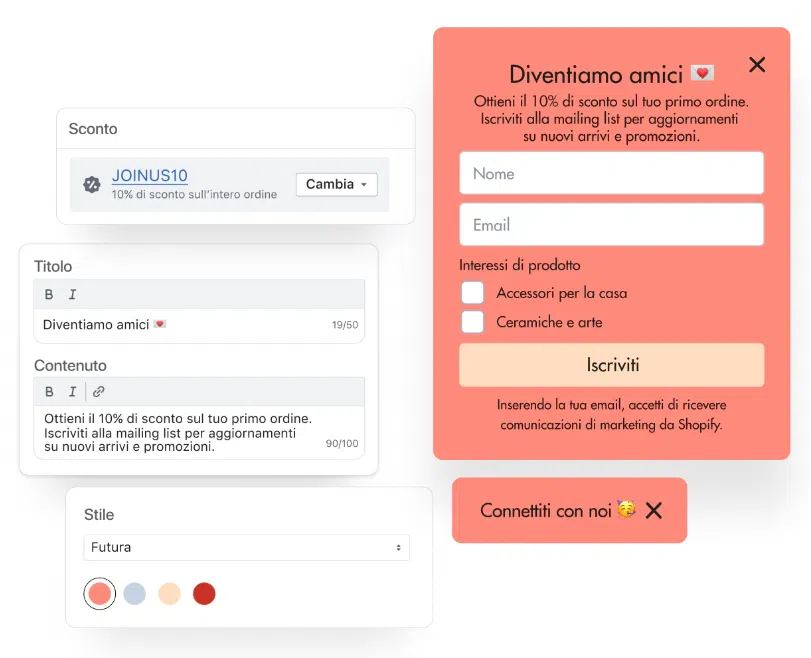
Shopify plans and pricing
Shopify can be paid monthly or yearly. These are the UK starting prices on annual billing:
- Basic from £19 a month;
- Grow from £49 a month;
- Advanced at £259 a month;
- Plus from £1,800 a month.
Card payment fees differ by plan, and selling internationally across several markets (with the option of adding more than 3 markets) is available from the Advanced plan.
Google Forms
Google Forms is a standalone tool for building forms and quizzes. It is free to use and lets you create forms with several questions or full quizzes.
We can use it both to build forms that collect leads and to run quizzes that qualify and segment them.
Unlike the tools covered above, such as Elementor or Shopify, Google Forms only builds forms and cannot create a whole website.
Google Forms plans and pricing
Google Forms is free and has no paid plans.
ClickFunnels
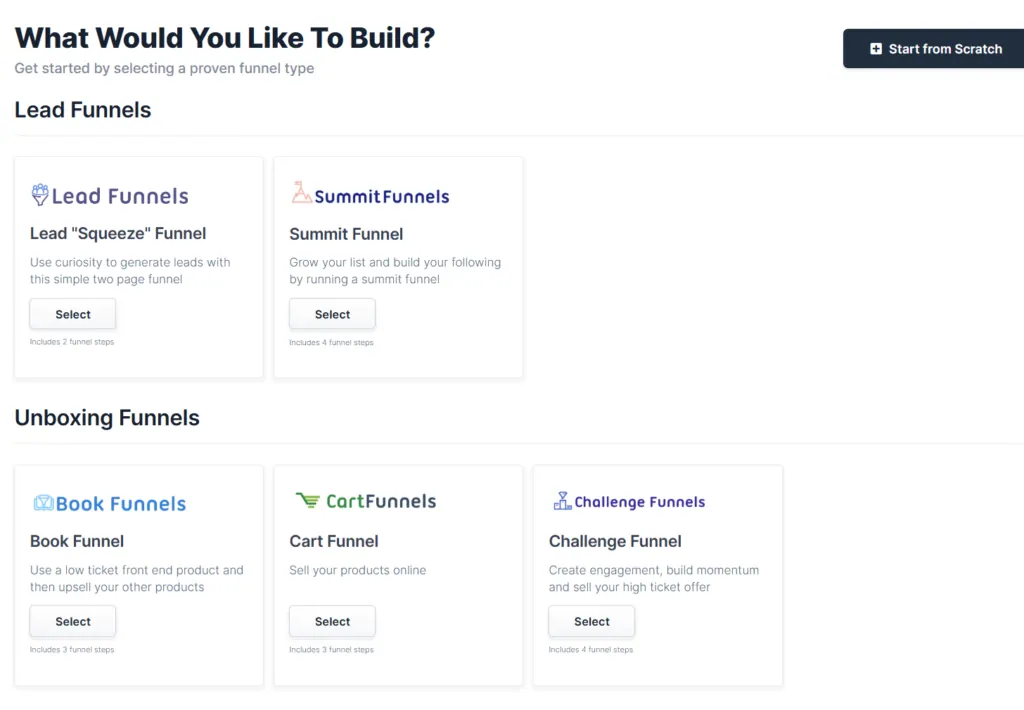
One of ClickFunnels' features is creating a landing page and adding it to your sales funnel in a few clicks.
Compared with the solutions above, ClickFunnels lets you build a landing page inside the tool itself with a dedicated page builder.
Beyond that, the tool is mainly used to structure a sales funnel. It also offers email marketing and A/B testing tools.
ClickFunnels plans and pricing
- Startup from $81 / month, with 3 workspaces and up to 3 team users;
- Pro from $248 / month, with 10 workspaces and up to 10 team users.
Live chat and call software
For lead generation, live chats (usually in the bottom right-hand corner of websites) and the option to book a callback are very useful.
Several tools let you add widgets to your website that show a chat or let visitors book an appointment or a phone call.
Some examples:
- Zendesk: chatbot and canned responses;
- LiveChat: chatbot with programmable responses;
- Callpage: shows a popup or widget to book a call;
- Limecall: organises callbacks, with call recording and forwarding;
- Calendly: a calendar tool for scheduling a call or a meeting.
Zendesk
Zendesk is one of the most used customer service platforms. It can add an instant messaging system directly to your website.
A system like this can encourage visitors to get in touch. A big advantage of the tool is the option to set up integrations or chatbots that give quick answers to common questions.

Zendesk plans and pricing
- Support Team from $19 a month (per agent, billed yearly);
- Suite Team from $55 a month (per agent, billed yearly);
- Suite Professional from $115 a month (per agent, billed yearly);
- Suite Enterprise on request.
Depending on the plan, you can use AI-based chatbots (from the Suite Team plan), along with other features such as creating and managing tutorials (both internal ones for the company and ones for customers).
LiveChat
LiveChat is worth mentioning among the tools that add a chat to your site. It creates a widget that shows a chat on the website. One of its most useful features is the option to add a chatbot and use AI to answer frequently asked questions.
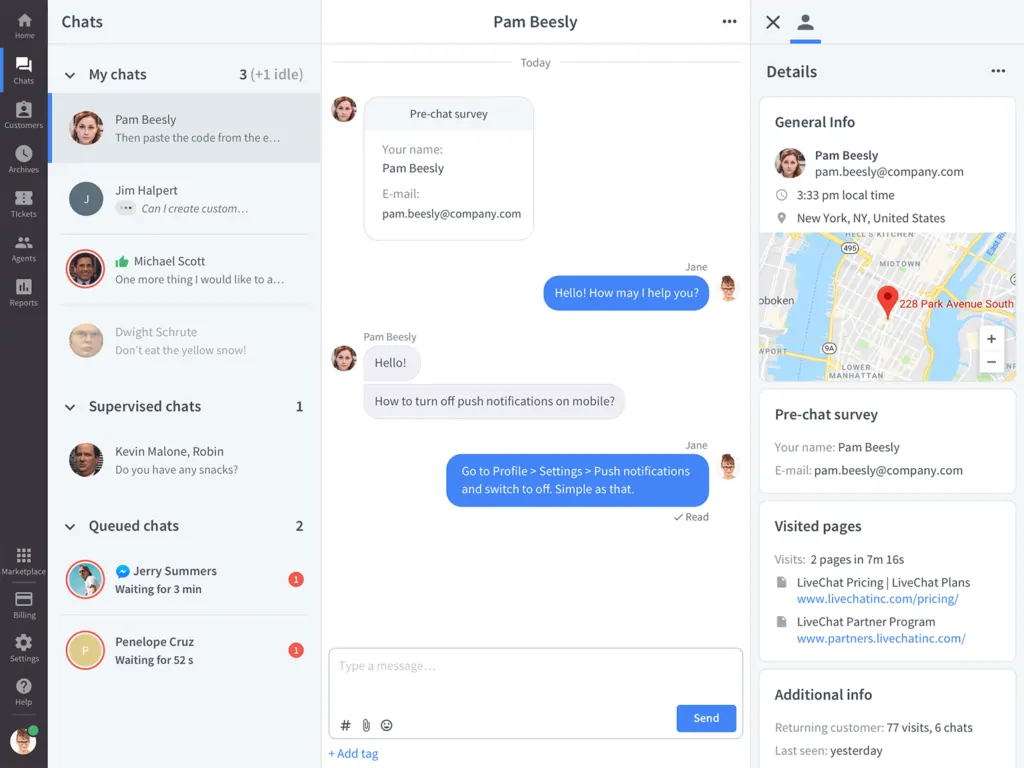
LiveChat has many integrations, including WhatsApp Business and instant translation. It also integrates with Shopify, BigCommerce and other CMSs such as Squarespace.
LiveChat plans and pricing
LiveChat has several plans:
- Starter from $20 a month;
- Team from $41 a month;
- Business from $59 a month;
- Enterprise on request.
Higher plans include more integrations: AI chat analysis and summaries, for example, come with plans such as Business. Some features, such as the chatbot, are billed separately and start at $52 a month.
Calendly
As well as tools that add widgets to our site, it can be very useful to add an appointment booking tool.

Calendly is exactly this kind of tool, and we can use it, for example, to schedule pre-sales calls or meetings. With it we can:
- set our availability on the calendar;
- sync different calendars (such as Google Calendar or Outlook);
- connect video call apps such as Microsoft Teams and Google Meet;
- share the link to our Calendly easily.
Calendly plans and pricing
Calendly has several plans:
- free: connects a single calendar and one event type;
- Standard from $10 per person a month, with unlimited events, several connected calendars and integrations with HubSpot and others;
- Teams from $16 per person a month: suited to integrating with Salesforce and HubSpot and to advanced features.
- Enterprise, tailored, from $15,000 a year.
Automation tools
Automation tools are essential both for getting different tools to talk to each other and for speeding up everyday tasks.
They matter for lead generation too. Here are some practical examples of tools that help.
Zapier
When it comes to integrations and automation, Zapier is the clear leader. Put simply, Zapier lets several tools communicate with each other so we can build an entire workflow of actions.
As a practical lead generation example, Zapier can chain a series of actions:
- someone fills in a contact form;
- the information is stored;
- based on that information, the lead is added to the CRM as qualified or unqualified;
- an email sequence starts for qualified leads, in response to a given trigger or after a set time.
This image shows an example of a workflow you can build by connecting different tools with Zapier.
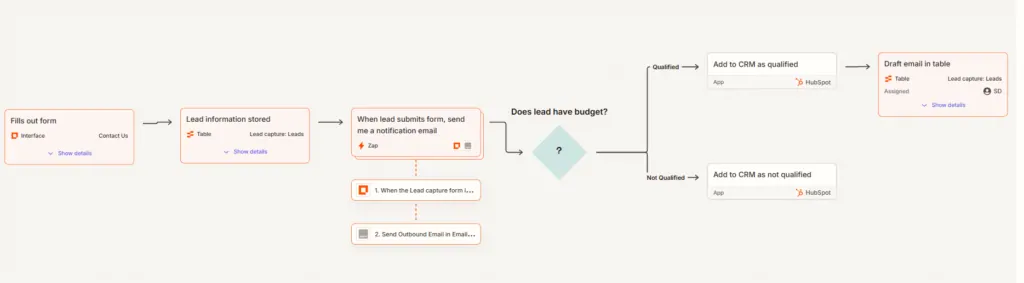
As well as Zaps automations, Zapier offers ways to build workflows in databases (Tables) and in web pages or apps (Interfaces).
Zapier plans and pricing
These are the plans for Zaps automations:
- Free, limited to 100 tasks a month;
- Professional, from $19.99 a month (single user);
- Team, from $69 a month, for teams of up to 25 users;
- Enterprise, priced on request, with no task or user limits.
Not every integration is available on the free plan: here is the list of premium apps, available from the Professional plan upwards.
Make
Make is very similar to Zapier and lets us build automation flows in a simple way. You can start from ready-made templates that help structure even a more complex flow.
For lead generation, with Make we can for example:
- capture leads through Facebook and send them to our CRM;
- run a check before sending so there are no duplicate leads.
This is just one example of the kind of automation you can build with Make.

Make plans and pricing
Make offers monthly and annual licences; these are the annual prices:
- free, limited to 1,000 operations a month; core, from $9 a month, up to 10,000 operations;
- pro, from $16 a month, up to 10,000 operations, with extra features such as custom variables;
- teams from $29 a month, up to 10,000 operations, suited to team collaboration;
- enterprise, on request, with advanced automation and security features.
LinkedIn Sales Navigator
For finding qualified leads on LinkedIn, Sales Navigator is the right tool. It runs advanced searches on decision makers' characteristics, such as current role or demographics.
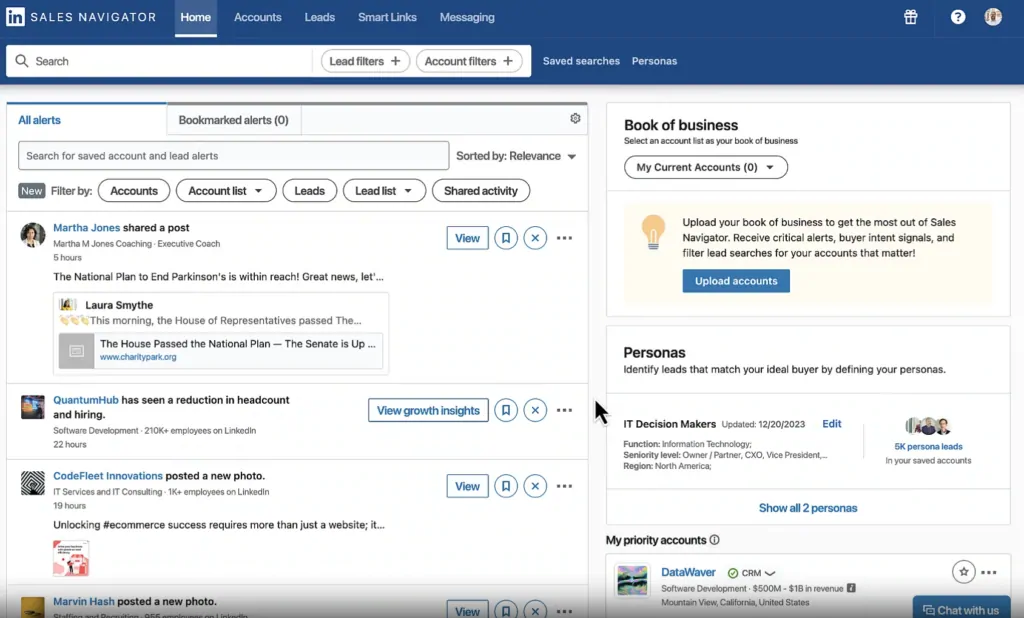
Its AI-assisted features give summary data on prospective leads. One of its standout features is CRM integration, which is how the data you collect gets into your contact management system.
LinkedIn Sales Navigator plans and pricing
LinkedIn Sales Navigator Core costs £94.99 a month in the UK ($119.99 in the US).
Sales Navigator Advanced starts at £130 a month.
A free trial is usually offered to members who have not had a LinkedIn free trial in the past 12 months, before moving to the paid version.
Features of lead generation tools
The lead generation software we have covered has many features that can support a lead acquisition strategy. Here are the main ones.
Lead capture: these tools let us build forms, landing pages, chatbots and call booking widgets. All of them collect contact details that interested customers leave voluntarily.
Lead qualification: with lead intelligence tools such as Leadinfo, together with website analytics, we can trace the traffic to our site and get relevant data and contact information. These tools are how we get data on the different decision makers involved.
Lead scoring and segmentation: many tools, CRMs in particular, have built-in lead scoring that assigns leads a score based on the type and number of interactions. Surveys can qualify leads further, for example by demographics or interests.
Lead nurturing: collecting leads is only one of the steps these tools help with. Many of them, ActiveCampaign for example, let us build nurturing campaigns to strengthen relationships with leads and raise engagement.
Management and automation: tools such as Salesflare let us build sales pipelines to follow each lead's conversion step by step. Tools such as Zapier connect different tools, making it easier, for example, to add new leads to our CRM.
Benefits of lead generation tools
In lead generation, especially in B2B, you need detailed information on leads and a sound way to qualify them.
Lead generation tools improve this process and make it more efficient.
The main benefits are:
- time saved: the tools use automated systems to qualify leads, move information from one tool to another or start automatic email campaigns. Automation saves time, raises efficiency and avoids errors.
- detailed insights: the data analysis these tools allow means we can segment leads more finely and assess how well our campaigns and lead capture systems are working.
- attracting qualified leads: more information on site visitors, for example through lead intelligence systems, shows us which leads are really qualified.
How to choose lead generation tools
In this article we have covered some of the most used tools for a lead generation strategy. So how do you choose?
There are a few key factors to consider:
- Type of tool: there are systems for inbound lead generation, which help us get contact information from the traffic we already have. Then there are outbound lead generation techniques, which let us actively look for interested leads. Deciding which strategy to follow is the first step to choosing the right tool.
- Available integrations: when choosing a tool, make sure it can integrate with the tools you already use. If we build a form to collect contacts, for example, that system has to talk to our CRM. So integrations with other tools need to be part of the choice. Tools such as Zapier help here by connecting tools to each other.
- Available automations: one reason to adopt a new tool is to save time. When choosing, look for the tool that automates the most processes, leaving more time for working on strategy.
- Cost versus benefit: when adopting a tool, weigh its recurring costs against your budget. That calls for careful analysis in light of the goals you want to reach.
FAQs about lead generation tools
What is B2B lead generation and what is it for?
A lead generation strategy is essential in B2B because it puts you in touch with prospective customers and qualifies them, so you can focus your efforts on the best-qualified leads.
Lead generation software: free or paid?
When choosing a lead generation tool, budget matters. Many tools offer free versions or trials with significant limits (most of the tools covered here offer a free plan or free trial before purchase).
Depending on your needs and goals, some tools may be enough in their free version. If you want the full feature set, consider a paid plan that fits your requirements.
How do lead generation tools work?
As we have seen, the tools that help generate leads cover many different functions.
They range from tools for building landing pages to tools that find company email addresses or add chatbots to your website.
Does a company need lead generation tools?
Acquiring and qualifying leads takes an automated, integrated system. These tools collect contact details, score leads and help contact them in a personalised way that also reflects their score.
How do you choose the right lead generation tools?
When choosing a lead generation tool, look for these functions:
- lead capture systems (e.g. landing pages or forms);
- lead segmentation;
- email sending;
- integration with other tools such as CRMs.
You also need to weigh cost against benefit within your budget.
Visilay can help with your lead generation strategy
Lead generation means having a well-defined strategy that puts the right tools to work capturing leads. We have shown you several tools you can build into your strategy, many of which we use every day with our clients.
Choosing the tools is only one step towards the goal of getting genuinely qualified leads. At Visilay we can help you define your lead generation strategy, including choosing the tools, based on research into your target market and a clear definition of your goals.
